
Hadi Tavakoli
Software architect
Prompt Engineer
Hadi Tavakoli
About Me
I began programming with ActionScript 2 in 2002 and upgraded to ActionScript 3 in 2009. After working as a freelancer and an Envato Author for several years, I founded my own company, myflashlabs.com, in 2011. Initially, we focused on developing AIR mobile apps, but in 2013, we shifted our focus to creating ANEs. However, I felt there was more to explore beyond ANEs, so I joined eliq.com in 2019 and decided to close my ANE service company in the summer of 2021.
Check out the web archive of how myflashlabs.com used to look before the business was shut down.
What I Do Now
Privacy & Security Policy
Last Updated: June 9, 2026
This Privacy & Security Policy describes how our Atlassian Forge Applications ("Apps") handle user privacy, data security, incident management, and vulnerability resolution when installed and utilized within Atlassian Cloud products (such as Confluence or Jira). Our apps are published on the Atlassian Marketplace by developer Mohammadhadi Tavakoli Ghinani.
1. Privacy by Design
We believe in a strict "Privacy by Design" philosophy. Our Apps are built on the secure Atlassian Forge Platform. This means the Apps operate entirely within Atlassian's secure cloud infrastructure and execute client-side logic directly in your browser. We do not host external databases, servers, or trackers.
2. Data Collection and Storage
No Personal Data Collection: We do not collect, transmit, store, or have access to any personal data, user credentials, or business information through our Apps.
App Data and Configurations: Any configuration data, user inputs, or diagram codes (e.g., Mermaid diagram inputs created inside our Confluence macros) are stored natively inside your Atlassian host instance (using native Atlassian page storage or native Forge Secure Storage APIs). No data is ever transmitted to us or any third-party servers.
3. Third-Party Services
Our Apps do not integrate with external APIs, analytics, or third-party web services. For example, our Mermaid Confluence App renders diagrams locally in your web browser using client-side libraries. No external network request is made to compile, render, or save your diagrams.
4. Incident Response & Management
We follow a defined security incident response procedure to manage vulnerability reports and potential security flaws:
- Incident Identification & Reporting: Security vulnerabilities or potential breaches can be reported directly via email at tahadaf@gmail.com.
- Response SLAs: We acknowledge security incident reports within 24 hours of receipt and perform an initial triage to assess severity.
- Remediation: For high-priority security issues, we aim to deploy patches within 48 hours. Because our apps use the Atlassian Forge framework, updates are deployed automatically and instantaneously to all customer sites without requiring manual customer intervention.
- Customer Notification: If an incident affects customer workspaces or data, we will notify affected administrators via their registered Atlassian contact details or email within 72 hours of verification.
5. Vulnerability Management
We maintain a proactive approach to finding and fixing security flaws:
- Dependency Scanning: We use automated tools (such as GitHub Dependabot and npm audit) to continuously scan our codebase and dependencies for known vulnerabilities (CVEs).
- Atlassian Security Programs: We participate in Atlassian's security ecosystem programs, monitor reports from Atlassian's Security team, and adhere to the Atlassian Marketplace Security requirements, ensuring prompt resolution of any flagged vulnerabilities.
- Regular Updates: We regularly update our front-end libraries and build tooling to ensure the latest security fixes are applied.
6. General Security Controls
Because all storage and computation (apart from local browser rendering) are managed directly by Atlassian, your data is protected under Atlassian's enterprise-grade cloud security infrastructure. In addition, we apply the following security controls:
- Access Control: Code repositories are hosted in secure, private environments with multi-factor authentication (MFA) required for developer access.
- Least Privilege Permissions: Our Forge app manifest request scopes are strictly limited to the minimum set of permissions necessary to perform the macro rendering (e.g., read Confluence content properties only where required, with no administrative permissions).
- Client-Side Rendering Safety: For apps like Mermaid Studio, all rendering and parsing of Mermaid diagrams occur client-side in the user's browser using sanitized and scoped libraries, preventing Cross-Site Scripting (XSS) or remote code execution risks.
For more details on Atlassian's compliance and data protection policies, please visit the Atlassian Trust Center.
7. Your Rights
Since we do not collect, store, or process any of your personal data on external servers, we have no personal data to view, export, edit, or delete. If you wish to delete any data associated with our Apps, you can simply delete the specific macro contents or uninstall the App from your Atlassian instance.
8. Contact & Support
If you have any questions or inquiries regarding this Policy or the security of our Forge apps, please contact us at:
Email: tahadaf@gmail.com
Security Policy
Last Updated: June 9, 2026
This Partner Security Policy outlines the security standards, practices, and controls we implement to protect our Atlassian Forge Applications (including Mermaid Studio) and the data of customers who use them.
1. Cloud Security & Architecture
Our Apps are built exclusively on the Atlassian Forge Platform. This architecture ensures built-in security controls by executing the App's code in Atlassian's secure serverless environment and inside the user's browser via secure iframe sandboxes. Key security benefits of this architecture include:
- No External Server Hosting: We do not operate external web servers, application servers, or databases for our Apps. Your data never leaves Atlassian's cloud perimeter.
- Zero Data Persistence on Vendor Systems: We do not store, process, or transmit your Confluence page contents, Jira issue details, or diagram codes to any third-party servers. All configuration and app data remain stored within your Atlassian tenant.
- Tenant Isolation: Since all computation is done within Atlassian's multi-tenant infrastructure, customer data is completely isolated under Atlassian's enterprise security boundaries.
2. Incident Response & Management
We take security incidents seriously. In the unlikely event of a suspected or confirmed security issue, we follow a strict incident response procedure:
- Incident Identification & Reporting: Security vulnerabilities or potential breaches can be reported directly via email at tahadaf@gmail.com.
- Response SLAs: We acknowledge security incident reports within 24 hours of receipt and perform an initial triage to assess severity.
- Remediation: For high-priority security issues, we aim to deploy patches within 48 hours. Because our apps use the Atlassian Forge framework, updates are deployed automatically and instantaneously to all customer sites without requiring manual customer intervention.
- Customer Notification: If an incident affects customer workspaces or data, we will notify affected administrators via their registered Atlassian contact details or email within 72 hours of verification.
3. Vulnerability Management
We maintain a proactive approach to finding and fixing security flaws:
- Dependency Scanning: We use automated tools (such as GitHub Dependabot and npm audit) to continuously scan our codebase and dependencies for known vulnerabilities (CVEs).
- Atlassian Bug Bounty & Security Programs: We participate in Atlassian's security ecosystem programs and monitor reports from Atlassian's Security team. We adhere to the Atlassian Marketplace Security requirements, ensuring prompt resolution of any flagged vulnerabilities.
- Regular Updates: We regularly update our front-end libraries and build tooling to ensure the latest security fixes are applied.
4. General Security Controls
- Access Control: Code repositories are hosted in secure, private environments with multi-factor authentication (MFA) required for all developer accounts.
- Least Privilege Permissions: Our Forge app manifest request scopes are strictly limited to the minimum set of permissions necessary to perform the macro rendering (e.g., read Confluence content properties only where required, with no administrative permissions).
- Client-Side Rendering Safety: For apps like Mermaid Studio, all rendering and parsing of Mermaid diagrams occur client-side in the user's browser using sanitized and scoped libraries, preventing Cross-Site Scripting (XSS) or remote code execution risks.
5. Contact & Reporting
If you discover a security vulnerability or have a security question, please reach out to us at:
Email: tahadaf@gmail.com
Mermaid Studio
Mermaid Studio is a premium, lightweight macro extension for Atlassian Confluence that allows you to design, edit, and render rich flowcharts and mind maps directly inside your pages using plain-text Mermaid syntax.
Key Features
Getting Started
Step 1: Insert the Macro
While editing any Confluence Cloud page, you can insert the macro in two quick ways:
- A Type /mermaid-studio directly into the page editor and press Enter ↵.
- B Click the insert menu + icon in the toolbar, search for Mermaid Studio, and select it.
Step 2: Compose Your Diagram
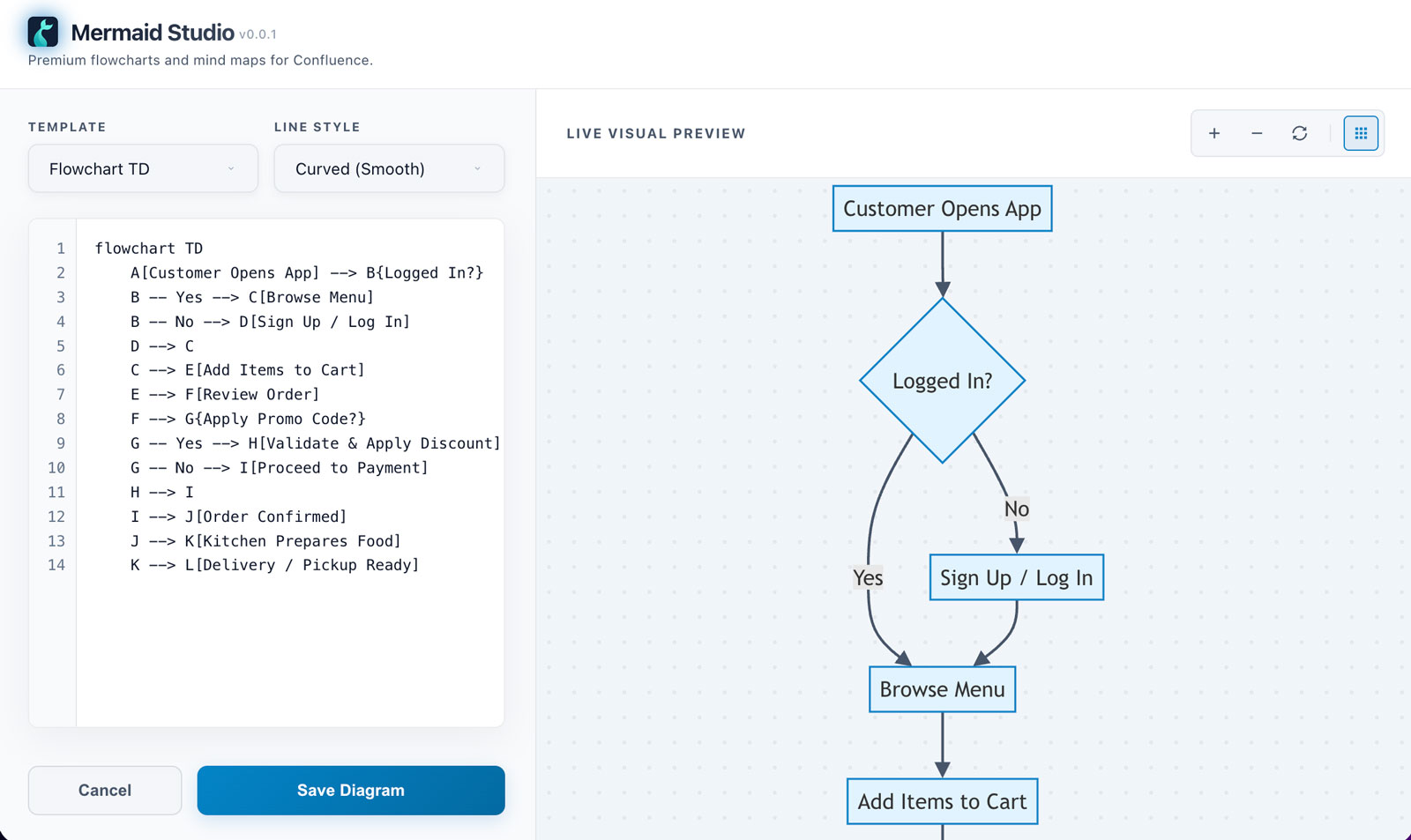
In the editor panel that opens, write your Mermaid syntax. Use the dropdown settings to switch starting templates or adjust the connection line styles. Use the visual canvas on the right to navigate the live visual rendering.
Step 3: Save and View
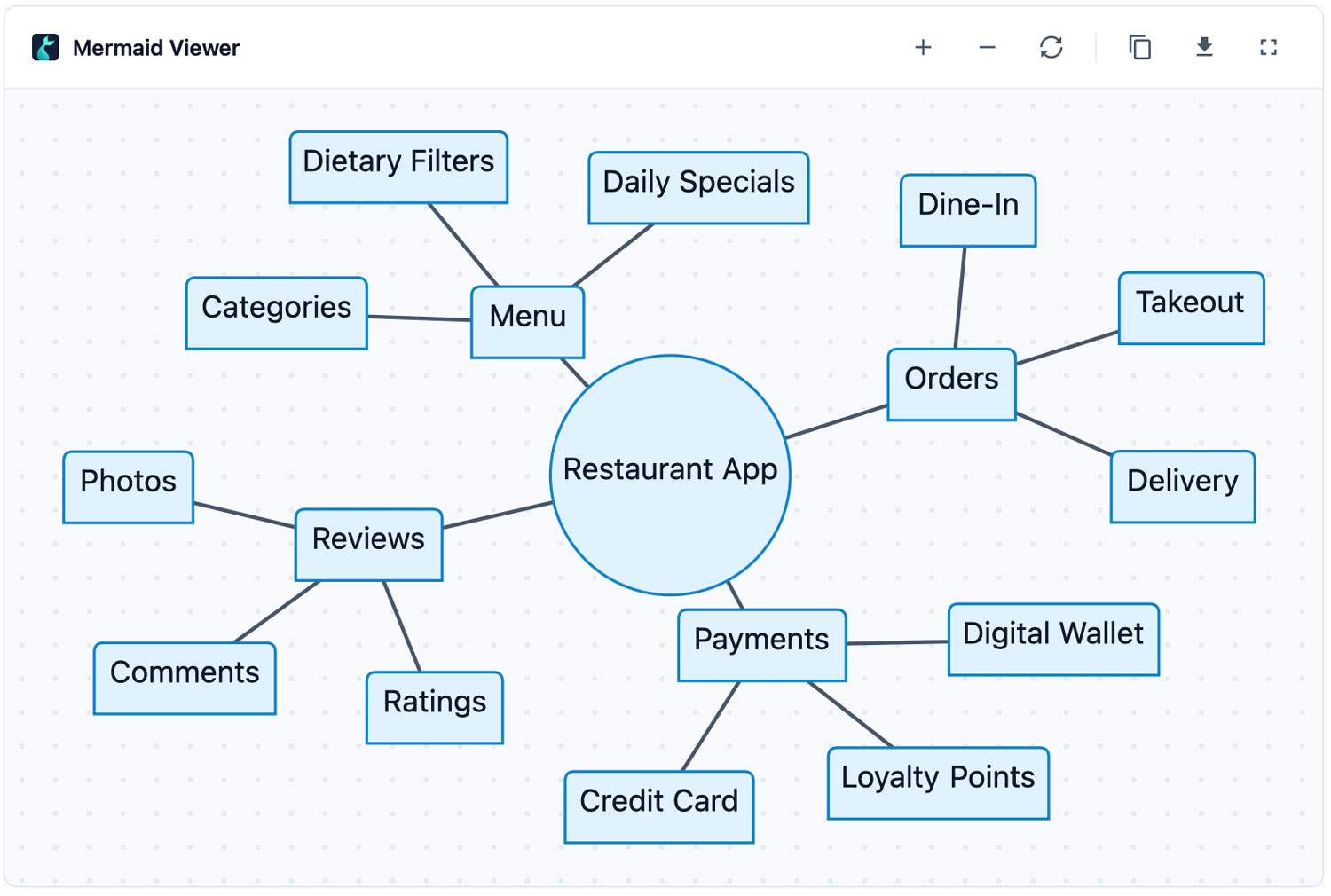
Click the Save Diagram button at the bottom left to close the editor and place the diagram on the Confluence page. Once the page is published, users can hover over the macro to zoom, pan, toggle full screen, copy raw code, or download the SVG.
Frequently Asked Questions
Q: Does my diagram data leave Confluence?
A: Absolutely not. Mermaid Studio is built on the secure Atlassian Forge platform. All diagram compilation, rendering, and macro state data remain 100% local within Confluence native storage. No external network request is ever made.
Q: Is there support for seq diagrams, class diagrams, state diagrams, etc.?
A: Yes! While the template selectors focus on Flowcharts and Mind Maps for quick startup, the editor fully supports compiling any valid Mermaid syntax (Sequence Diagrams, Class Diagrams, State Diagrams, Entity-Relationship Diagrams, Gantt, Pie charts, etc.) typed directly into the editor.
Support and Inquiries
If you encounter any bugs, need assistance, or want to suggest new features for Mermaid Studio, feel free to reach out directly via email at tahadaf@gmail.com.